AI-generated mind maps: visual studying has never been this easy
Your notes turned into interactive mind maps with one click. How AI generation works, why visual learning is effective, and what you can do with them.

You've spent three hours reading a 40-page chapter. You've highlighted sentences, copied definitions, even rewritten entire paragraphs. But when you try to explain the topic from scratch, you realize you can't see how the pieces fit together. You know scattered facts, but you can't see the structure.
That's exactly the problem mind maps solve. And it's exactly what we just launched in ExamFlow.
The real problem: information without structure
Studying isn't about accumulating data. It's about building connections. Your brain doesn't work like a hard drive storing blocks of text in sequential order. It works like a network: each concept connects to others, and the more connections that exist, the easier it is to retrieve information when you need it.
The problem with linear notes (a PDF, a summary, a bullet list) is that they present information in a format that doesn't reflect how your brain organizes it. You read top to bottom, from point 1 to point 47, and everything looks equally important. There's no visual hierarchy. No explicit relationships. No way to see at a glance which concepts are central and which are details.
Mind maps solve this because they make the invisible visible: the logical structure of knowledge.
This isn't a new idea. Tony Buzan popularized mind maps in the 1970s, and there are decades of cognitive psychology research backing their effectiveness. A meta-analysis published in Educational Psychology Review found that graphic organizers improve retention and comprehension compared to linear study methods, especially in subjects with high conceptual density.
The problem has always been something else: making them by hand takes forever. You have to read all the material, decide what's important, organize the hierarchy, and then draw or create the map. That's an hour of work for a single topic. Multiply that by 15 topics in a course, and you're looking at 15 hours just creating maps.
What if AI could do it for you in seconds?
How it works in ExamFlow
The flow is deliberately simple. Three steps:
- Select a topic that already has processed documents (notes, textbooks, presentations you've uploaded).
- Click "Generate mind map" and the AI analyzes all of the topic's content.
- In a few seconds you have an interactive mind map with the complete structure of the topic.
That simple. But what happens under the hood is quite a bit more sophisticated.
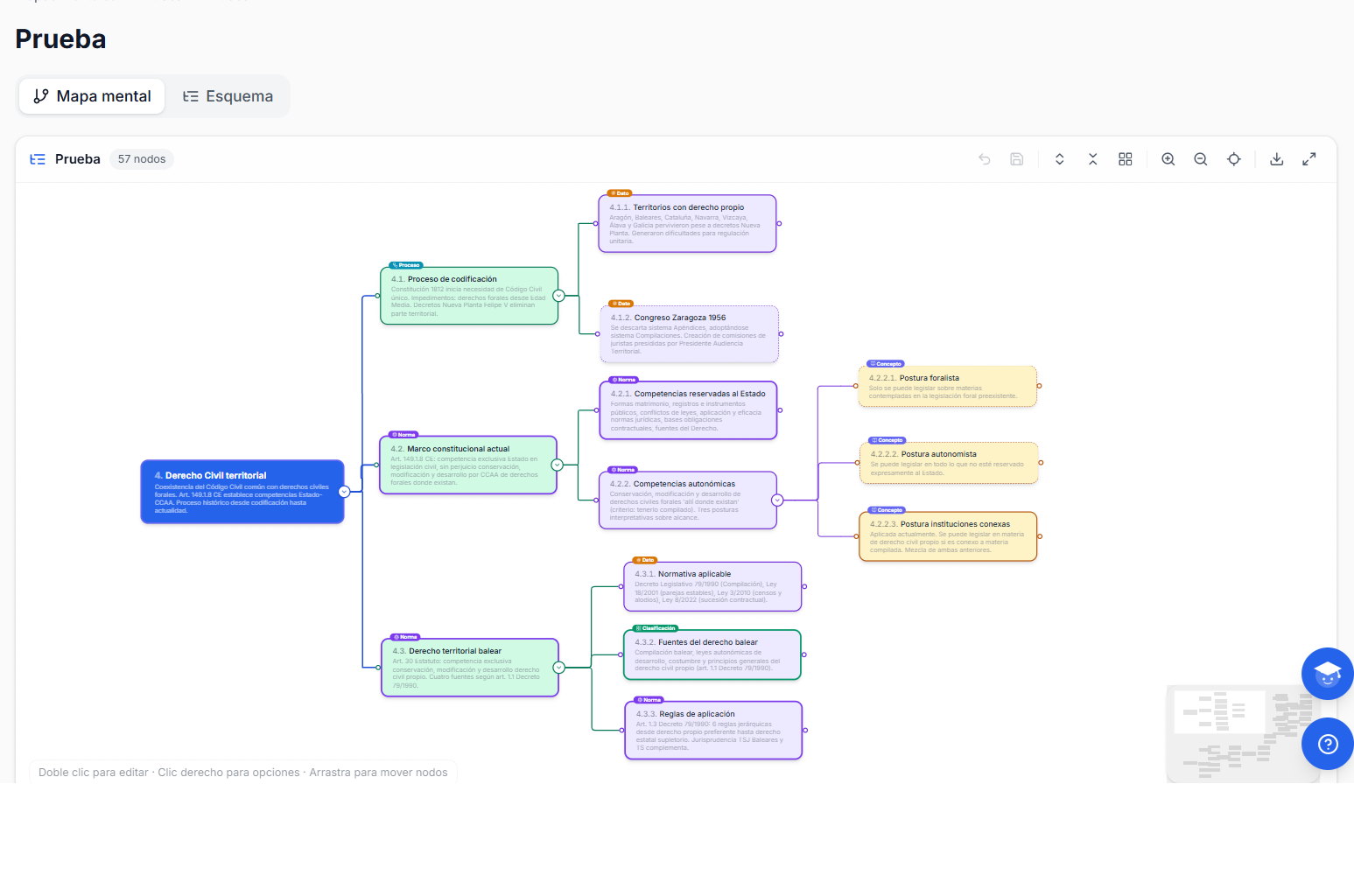
Generation: it's not a summary with arrows
When you hit generate, the system isn't simply extracting titles and subtitles from your documents. That would be a table of contents shaped like a tree, not a useful mind map.
What the AI does is a real content analysis. First, it identifies the central concepts of the topic (between 3 and 7, because more than 7 exceeds working memory capacity). Then it establishes the relationships between them: what causes what, what requires what, what complements what, what contradicts what. Finally, it organizes everything into a visual hierarchy where depth reflects the level of detail.
Each node in the map has a semantic type: it can be a concept, a process, a law, a definition, a classification, a data point, or an example. This isn't decoration. The type determines the color and icon, allowing you to identify at a glance what kind of information each part of the map contains.
It also has an importance level: core (essential knowledge), important (what you should know), or detail (what completes but isn't critical). Core nodes are shown with a solid, more prominent border. Details use a dashed border. Again, this isn't aesthetic: it's functional. When you're reviewing the night before your exam, the core nodes are your survival guide.
Cross-references: the hidden value
Beyond the parent-child hierarchy (a concept has sub-concepts), the map can show cross-references between nodes that aren't hierarchically connected. For example, in a Constitutional Law topic, the "Fundamental Rights" node might have a "requires" relationship with "Constitutional Court," even though they're on different branches of the tree.
These cross-cutting connections are what truly supercharge learning. They're what turn a list of concepts into a knowledge network.
The map is yours: edit, reorganize, expand
An AI-generated map you can't touch is a pretty poster but useless for studying. Real learning happens when you manipulate information, not when you look at it.
That's why ExamFlow maps are fully editable:
Edit nodes. Double-click any node to change its title. Did the AI write "Normative framework of civil service" and you'd rather have "Civil service laws"? Change it. It's your map, it needs to speak your language.
Add nodes. You can add children (sub-concepts) or siblings (concepts at the same level) from the context menu or with the quick button that appears on hover. Missing a concrete example that helps you remember? Add it.
Delete nodes. If the AI included something irrelevant to your exam, remove it. Less noise, more signal.
Reorganize. Drag nodes to place them where they make the most sense to you. The map remembers custom positions even after you close and reopen it.
Collapse and expand. Complex topics can generate large maps. You can collapse entire branches to focus on the section you're studying and expand them when you need the detail. The button shows how many children each collapsed node has, so you never lose track of what's underneath.
Undo. Because everyone makes mistakes. Ctrl+Z undoes the last 20 changes.
Two views, one body of knowledge
Not everyone thinks alike. Some people process information better in visual-spatial format (the map with nodes and connections), while others prefer structured text (an outline with indentation levels).
That's why every mind map has two views:
- Map view: the interactive canvas with nodes, colors, and connections. Ideal for getting the big picture and understanding relationships.
- Outline view: the same content in hierarchical text format, with collapsible sections. Ideal for reviewing linearly or searching for a specific concept.
Both views reflect exactly the same content. If you edit something in the map view, it updates in the outline, and vice versa. Use whichever works best for you in the moment.
Incremental generation: your map grows with you
Course notes are rarely complete from day one. You collect material throughout the term: new chapters, lecture notes, a classmate's outlines, supplementary articles.
When you upload new material to a topic that already has a mind map, the system detects there's new content. When you regenerate, it doesn't start from scratch. It analyzes what's new, what it adds to the existing map, and integrates it intelligently without destroying the structure you already had (or the edits you'd made).
It's the difference between a static tool you use once and a living tool that evolves with your studying.
Export: your map outside ExamFlow
Want to print the map and stick it on your bedroom wall? Include it in an assignment? Send it to a classmate? You can export it as a PNG image with one click. The complete map, with all nodes expanded, colors, and connections.
What it's great for (and what it's not)
Mind maps aren't a magic bullet. They're a specific tool for a specific problem.
They're perfect for:
- Getting a big-picture view of a topic before diving into the details. Look at the map for 2 minutes and you already know what the topic covers, which concepts are key, and how they relate.
- Quick review. The night before your exam, open the map, scan the core nodes, and confirm you can explain each one. Much more efficient than re-reading 40 pages.
- Spotting gaps. If you look at a node and can't explain what it means, you have a gap. The map makes it visible before you discover it during the exam.
- Connecting concepts from different parts of the syllabus. Cross-references help you see connections that aren't obvious in linear notes.
- Preparing oral presentations. If you need to defend a topic in an oral exam (civil service exams, thesis defense), the map is your visual script.
They don't replace:
- Reading the full material. The map is a complement, not a substitute. You need to read your notes to understand context and nuances.
- Practicing with exams. The map helps you organize, but active practice (answering questions, solving cases) is what consolidates knowledge. Combine them.
- Memorizing specific data. For dates, legal articles, specific formulas, flashcards with spaced repetition are still better.
How to integrate them into your study routine
The most effective way to use mind maps is as part of a complete study workflow, not as an isolated tool:
- Upload your notes for the topic to ExamFlow and wait for processing.
- Generate the mind map for the topic. Spend 5 minutes scanning it and getting a sense of the structure.
- Study the full material (using the document viewer, generated summaries, or your own notes).
- Return to the map and try to explain each node in your own words without looking at notes. Mark the nodes you can't explain: those are your weak points.
- Generate an exam on the topic and take it. Compare your mistakes with the map: which branch contained the concepts you got wrong?
- Review with flashcards the specific data you need to memorize.
The map is your compass. It tells you where you are and what you're missing. Exams are your training. And all three together cover the three levels of learning: understand (map), practice (exams), and memorize (flashcards).
Available today for all users
Mind maps are available starting today for all ExamFlow users, both on the free plan (with a generation limit) and paid plans. They work with any type of content: university notes, civil service exam syllabi, secondary school material, or college entrance exam prep.
All you need is a topic with at least one processed document. The AI handles the rest.
If you already have an account, head to the Mind Maps section in your dashboard and try it with any topic. If you don't have an account, you can sign up for free and upload your first document in under a minute. The feature is explained in full on mind maps and outlines.
Your notes have a structure. It's time to see it.
Read also
Ready to study smarter?
ExamFlow transforms your study material into exams, flashcards and summaries with AI. Try it free for 14 days.
Create free account

