How it works
Every AI action uses Credits:
- generating an exam, a summary, an outline or flashcards
- AI-written notes
- reciting a topic
- a summary's audio
- grading written questions
- the explanation of what you got wrong in an exam
- uploading material (charged by page)
Before you confirm, each button shows you what it costs. If you're not happy with it, you spend nothing.
Talking to Exa is free, with a daily message limit. Printing and downloading don't cost credits either.
The full table of what each thing costs is at examflow.app/en/pricing/credits. You'll also find it in Settings → Credits, collapsed at the bottom.
Packs and plans
- Free trial: you get it when you sign up (see Getting started: account, level and menu).
- Express: a one-off credit pack, with no subscription. Purchased credits expire after 6 months.
- Study and Intensive: monthly plans, or annual ones, which are cheaper per month. Every month they top your credits back up to the plan's total. Credits you don't spend don't carry over to the next month.
Prices are at examflow.app/en/pricing.
You buy them in Settings → My plan. If you have a monthly or annual plan, Manage subscription is right there. Use it to cancel, change your card or download your invoices.
To switch to another plan, subscribe to the new one from My plan. This works for going from Study to Intensive or the other way round, or from monthly to annual. The old plan stops renewing.
Your balance and what you've spent
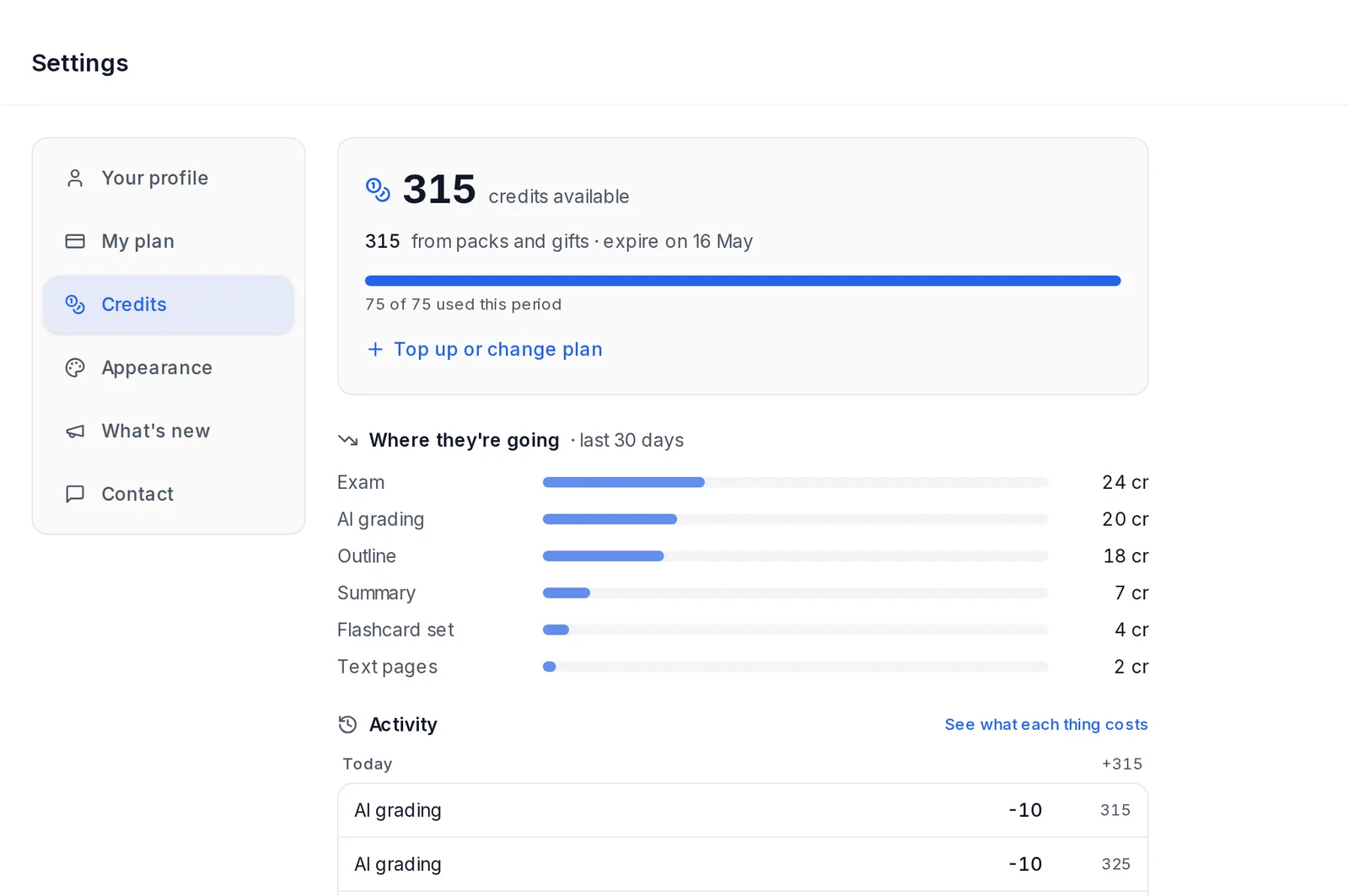 Settings, Credits: the balance, where they're going and the activity
In Settings → Credits you'll see:
- your balance, split into plan credits and purchased credits
- when they renew or expire
- Where they're going over the last 30 days
- your trial pages, if you're on the trial
- the Activity of every charge, with what set the price ("Exam · 20 questions")
The activity is grouped by day (Today, Yesterday, date), with what was added or deducted each day. The latest 15 transactions are shown. See more transactions loads earlier ones, back to the first.
Your balance is always visible in the side menu. On a phone, it's in the header. If you have fewer than 100 credits left, or the ones you bought expire in less than 30 days, a notice also appears at the top of every screen, with a link to My plan.
If you run out of credits
Your material is still there. You can look at it, review flashcards, take exams you've already generated and print.
To generate more, buy an Express pack or subscribe in Settings → My plan.
Cancelling
You can cancel whenever you like from Settings → My plan → Manage subscription. You keep access until the end of the paid period.
After that, your material is kept for 60 days. If you don't reactivate your plan, it's deleted. We'll email you beforehand.
Payments
You pay by card (Visa, Mastercard, American Express) through Stripe. We don't store your card details. Prices include VAT.
The Stripe payment page expires an hour after you open it. If it closes or expires, tap the pack's button in My plan again.
Free credits when you buy
Sometimes My plan shows a notice about free credits with a deadline. If you buy a pack before that time, they're added automatically, with no code. The notice includes the button to buy it with the gift.